When a vendor raises prices by 700%. How to use third-party software safely
This text has two levels. The main sections are decision-oriented – for people who choose the vendor and are accountable for the consequences of that choice. Subsections marked “For technical teams” contain specific implementation patterns. If you are only responsible for the vendor decision, you can skip the technical subsections. If you are working on integrating the vendor into the product, read everything.
First, a few examples
In 2023, Broadcom acquired VMware – software that for two decades had underpinned the data centers of most large companies worldwide. After the acquisition, customers received renewal offers with price increases ranging from 25% to 700%. Two years later, only 4% of customers had fully migrated to alternatives, and a typical migration takes 18–24 months (CloudBolt data via TechRadar).
Alternatives existed. The migration, however, was not a cost of rewriting code – it was the cost of rebuilding how the entire organization operates. Administrator procedures, IT team skills, dozens of other systems built on that technology – all of it had grown intertwined with VMware over two decades. You cannot solve that with an executive decision to “migrate to an alternative in 6 months,” because this is not an IT project. It is a real change in how the company works day to day. This risk cannot be limited by any engineering trick, because the dependency does not live in code. It lives in processes, in the team’s hands, in products that VMware supported along the way.
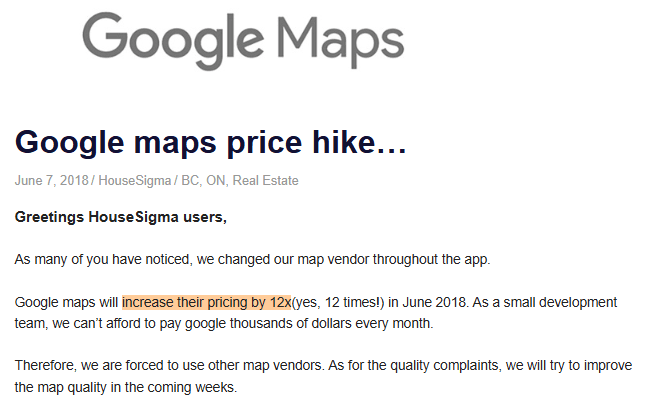
A smaller, but more widely known version of the same story happened five years earlier. In 2018, Google announced a new pricing policy for Google Maps Platform and gave customers 40 days to adapt. For many of them, especially smaller companies, that meant migration in emergency mode. HouseSigma, a Canadian real estate app, published a post admitting that it had been forced to change map providers, that quality dropped after migration, and that they were working to improve it in the coming weeks (archived post). It was not an isolated story; similar messages were published by other Google Maps customers, from flight tracking services to university departments (ADS-B Exchange, University of Washington).
HouseSigma did not choose poorly. At the time, it chose the most popular solution on the market. Alternatives existed – Mapbox was then a company with $100M in annual revenue – only nobody assumed they would need to pack up in 40 days. From the perspective of a HouseSigma engineer, it was 40 days for something normally planned as a multi-month project: replacing components, rewriting code in many places, retesting on every supported platform. Where the vendor was deeply embedded, you had to choose between a workaround (and degraded quality) and an incomplete migration.
The difference between HouseSigma and VMware comes down to scale. In one case, changing vendors was an emergency project in the product. In the other – a multi-year project across the entire organization. The mechanism in both situations, however, was the same: the vendor unilaterally changed the terms, and the customer had to bear the cost.
The decision about which software vendor to choose is not a technical decision. It is a decision about how much risk your organization consciously takes on – and how deeply one external player can embed itself in how that organization works. The decision about how to integrate them into the product – that one is. The first is made in the boardroom, the second – in the engineering team. Both are costly if made without understanding the consequences.
In this article, I use “safely” to mean four things:
- Data security – whether the data you pass to the vendor is protected on their side and, in case of an incident on their end, will not leak along with it.
- Operational security – when the vendor stops working, does your service keep running, or does it stop along with them.
- Contractual security – what the vendor can change without your consent: pricing, terms, feature scope, the company’s very existence.
- Change security – whether you learn that the vendor changed something that breaks on your side early and from documentation, or on a Friday afternoon from a production outage.
The rest of the article is a list of what you can realistically do about this – at the level of decisions before choosing a vendor, at the level of questions worth asking the team before implementation, and at the level of scenarios worth designing before an outage forces them on you.
What to check before you choose a vendor
A list of things to verify in documentation and in practice, in order from what most often decides the choice.
1. Does the vendor actually do what you need – in the way you need it.
This sounds trivial, but it requires separating two layers. The first: does the functional offering cover your requirements. The second, less obvious: does the way the vendor exposes those features allow sensible integration into your day-to-day processes.
An example from my experience: one of our clients chose a regional payment operator and only during implementation discovered that every new store had to be added manually in the vendor’s panel – it could not be done automatically. For a business planning to launch dozens of stores per month, that meant onboarding automation simply was not possible. The feature itself existed, but in a version their processes could not handle at scale.
The second layer of the same question is what you get out of the box and what your team must build themselves. This is where most projects lose budget, because it is assumed the vendor handles things that are “standard.” What is standard for one vendor can be a luxury at another – and you do not see that when signing the contract. You see it only when the team starts writing code.
Every such limitation can be worked around on your side today. Only each one stays with you for years. As you scale and add more features, the cost of maintaining those workarounds grows, and at some point it becomes greater than the cost of replacing the vendor. That is why it is worth asking your technical team for a written list of “what the vendor does not support or supports worse than the sales presentation suggested” – before you sign the contract, not after.
2. A test environment (sandbox) – and time to actually click through it.
A test environment is a version of the vendor’s system where your team can safely experiment before anything goes to production. No impact on real customers, real data, real money.
A common mistake is treating this as a simple “checkbox”: the vendor has one or does not. In practice, quality matters. Does the test environment let you realistically reproduce your most important scenarios – including the unusual, erroneous, edge ones? You will not find the answer to that question in official documentation. “What you CANNOT do” is usually not described. That only comes out when you try.
Every day the team actually “clicks through” full cooperation with the vendor in the test environment saves weeks of workaround work after go-live. There is no shorter path here.
3. Documentation quality
The industry agrees on what to expect from good vendor documentation: quick start, complete description of what and how can be done, working examples, guides organized around real scenarios, publicly available change history, clear feature deprecation policy. Stripe and Twilio are the most frequently cited industry benchmarks.
Separately, pay attention to the description of what happens when something goes wrong. A list of possible errors alone is not enough – you need a description of when which errors appear and what to do about them (Stripe is a good benchmark). In real cooperation with a vendor, more time goes to unusual situations than to the happy path. The absence of such a section means your team will discover every unusual case only when it happens to a customer.
A practical test you can do yourself or assign to the team: try to find answers in the documentation within an hour to 3–4 specific questions from your scenario (“how to handle a refund,” “what happens if the vendor does not respond in time,” “how to verify that it was actually the vendor, not someone impersonating them, who sent us payment information”). If there is no answer – every such question after go-live will end in waiting for vendor support and several days of blocked work for your team.
4. Technical support quality and response times
While implementing Stripe for one of our clients, first-line support responded very quickly on chat. If they did not have the information, they routed the question to their developers, who came back by email with a specific answer. The way a vendor handles such questions directly translates into how much time your team spends blocked on an unusual problem. The simplest test: before you decide on a vendor, send them 2–3 real technical questions and see what you get back. If the answer is “read section X of the documentation” (which someone on your side already read), you already know what to expect after go-live.
5. Status page and SLA
A status page will tell you more about a vendor than their marketing site. Check incident history from the last 6–12 months: how often something failed, how long it lasted, how they communicated it. No status page or an “always green” status page despite real outages is a warning sign. Read the SLA as a supplement to that history, not a substitute – a promise of 99.9% availability on paper and 97% real availability on the status page are two different stories. A good status page actually reports incidents with dates, scope description, and communication during the event – status.stripe.com is a sensible reference point. If a vendor’s status page shows 100% uptime on everything for many months, you are probably not looking at a real picture of availability – only at what the vendor decided to show there.
6. Cost control mechanisms on the vendor’s side
If the vendor bills per call or per operation – check what safeguards they offer against uncontrolled bill growth. Three things worth looking for:
- Hard limit – after exceeding a defined amount, the vendor stops providing the service instead of continuing to charge (OpenAI, Anthropic, Google Maps daily cap, Vercel since 2023, Netlify since 2024, GitHub Codespaces).
- Cost alerts – email or SMS notifications when your spending exceeds e.g. 50%, 80%, or 100% of a set budget. The notification alone does not block further spending – it is only a warning signal (e.g. AWS Budgets, a solution used by most vendors).
- Near real-time cost dashboard – minimum hygiene.
AWS is the best-known example of a vendor without a universal hard limit – you can spend any amount with them. The absence of any of these mechanisms means one bug in your system or an external attack on the publicly accessible part of your application can generate a bill proportional to traffic scale, with no automatic ceiling.
7. How the vendor responds to reported bugs
Many vendors maintain a public list of bugs reported by the community, usually on GitHub. Ask your team to look at it. How many open reports there are. How quickly vendor people respond. Whether they respond with specifics or redirect to documentation. Whether reports sit for weeks with no reaction.
This tells you what will happen when your team reports its own problem. It is also a second source of information about support quality – independent of what you get in the sales response. Public, dated, unfiltered by marketing.
8. Change history
A publicly available, dated change history tells you the vendor treats its software as a product, not as something that sometimes quietly changes. Stripe is a sensible reference point: every change described, dates known, changes requiring effort on the client side called out separately with dedicated guides. The absence of such a history means your team will learn about changes from an email to the account administrator – if that email reaches the right person and is read in time.
Do not let the vendor grow into your product
Choosing a vendor is a decision for today. The way your team “plugs” them into the product is a decision for years.
There are two extreme approaches. The first: the product “talks” to the vendor directly. Everywhere their services are needed, their name, their concepts, their way of working appear in the code. Cheap and fast to build. Replacing the vendor in 2 years: a quarters-long project.
The second: a thin translating layer stands between the product and the vendor. Your product speaks its own language (“process payment,” “send email,” “show map”), the layer knows the specifics of the particular vendor and translates them. Slightly more expensive to build. Replacing the vendor in 2 years: a weeks-long project.
This is a standard architectural topic. You do not need to know the details. It is enough to require your team to decide consciously – before writing the first line of code. Three questions worth getting answered before implementation:
- Does our vendor’s name appear in one place in our system, or in fifty? This one question tells you how long replacement will take.
- If we have to change vendors in 2 years, what kind of project is that – weeks, months, or quarters? The answer should be known before that moment arrives. Not after the fact.
- Can our system tests run without a real connection to the vendor? If not, every vendor outage blocks the team’s work, and every change in production requires a working vendor.
The same architectural decision also simplifies several less obvious things in the future: adding a second vendor in case the first fails, reacting to changes on the vendor’s side, cost monitoring. If you are just implementing a new vendor, it is worth asking your architect or technical lead to discuss this topic with the team before work starts, not after.
For technical teams: anti-corruption layer in practice
The pattern described above has a name in integration environments – anti-corruption layer (ACL). It comes from Eric Evans’ book “Domain-Driven Design” (2003) and is the standard answer to the question “how not to bind yourself to a vendor for life.”
The mechanism comes down to one thing: business logic does not know the vendor exists. It communicates with an intermediate layer that exposes its own abstractions –
PaymentProcessor,EmailSender,MapsProvider– with methods described in domain terms. Only inside that layer live the vendor’s SDK, their data models, and their semantics. All vendor details are confined to one module.What this layer specifically cuts off from the rest of the application:
- Communication with the vendor – HTTP calls, authorization, retries, timeouts, error handling. Only the ACL layer knows endpoint names, request formats, and response structure.
- Vendor data models –
stripe.PaymentIntent,stripe.Customerwith their specific fields. Business logic sees onlyPayment,Customerin its own types, with fields that make sense for the domain.- Vendor semantics – the fact that Stripe distinguishes
payment_intent.succeededfromcharge.succeeded, that a subscription has anincompletestate for 23 hours, that refunds work differently for different payment methods. The ACL translates these details into domain concepts: “payment succeeded,” “subscription active,” “refund completed.”Vendor replacement is the most obvious benefit, but not the only one. The same layer also solves:
Tests without a real vendor – in unit tests of business logic you do not need to call the real API or run a sandbox. You mock the
PaymentProcessorinterface. Tests are fast, deterministic, and work offline.Adding a second vendor in parallel – if you ever want multi-provider for email or SMS, you already have half the work done. New interface implementation, business logic unchanged.
Vendor API version changes – a breaking change in the Stripe API means a change in one module, not across the entire application.
A point for observability and control – one place where you log all vendor calls, measure latency, add a circuit breaker, wire in retries. You do not have to scatter this across the code.
Questions to ask the team before go-live
Most incidents after implementing a new vendor come from a very repeatable list of problems. You do not need to know the technical details to enforce quality. It is enough to know which questions to ask before something reaches production. If the team does not have a clear answer to any of the following – that is exactly the risk worth addressing before start, not after.
1. What happens when the vendor responds slower than usual? A slower vendor, if the team does not set a sensible timeout, can stop your entire system, not just part of it. The customer sees a slow application – even though something broke on the vendor’s side.
For technical teams: default values of popular HTTP clients are either no limit (axios in Node.js, Python requests, Go http.Client), or a limit absurdly high from the perspective of an application serving users (fetch: 5 minutes in Chrome and Node.js). Without an explicit timeout, requests to an external service that starts responding slowly hang in the application for minutes instead of milliseconds – in Node.js, where the number of concurrent requests can grow without bound, that means an endlessly growing backlog of operations that business logic never completes.
2. What happens if we send the vendor the same order twice? The network is unreliable. Your system sends an order, gets no confirmation, tries again. Without the right mechanism on the team’s side (and sometimes the vendor’s), that ends in a duplicated payment, duplicated order, or two emails to the customer.
For technical teams: two patterns work in parallel here. First – retry with backoff, preferably exponential: retrying a request at a fixed, short interval generates traffic directly proportional to the number of application instances and, during a transient vendor problem, can multiply normal traffic many times over, prolonging unavailability or causing throttling of your account. Second – idempotency keys: if the vendor provides them (and many do not), the client must send them. Without that, retrying after an error creates a duplicate operation even when the vendor executed it the first time and only its response was lost.
3. What happens when the vendor responds “OK” but did not actually perform the operation? Some vendors report errors in an unusual way – so that at first glance the response looks like success, even though failure information is inside. The team must know how a given vendor does this and deliberately look for it.
For technical teams: some APIs return errors in the response body with HTTP status 200 –
{"success": false, "error": "..."}with code 200. Standard HTTP libraries treat 200 as success, so code that does not check the response body considers the operation successful. What exactly this looks like for a given vendor – when they return an error in the body, when in the HTTP code, when in a header – depends on documentation quality. If the vendor has no dedicated section on error handling (like Stripe), you learn these things through an incident.
4. How will we know that a specific vendor has stopped working before customers report it? Standard monitoring of your application does not always cover what happens on the external vendor’s side. For every critical vendor, it is worth having a separate dashboard and alerts.
For technical teams: standard application metrics (response time, error rate) concern your endpoints. Response time and errors from external integrations must be consciously instrumented – metrics per vendor, alerts on latency and error spikes. Without that, degradation on the vendor’s side is invisible until a customer files a complaint.
5. What happens if someone impersonates our vendor? Many vendors send event information to your system (“customer paid,” “transaction canceled”). Without verifying that the message really came from the vendor, anyone from outside who knows its format can send their own. This is a real abuse vector if the team does not think about it – someone can e.g. “confirm” a payment that was never made.
For technical teams: the endpoint accepting webhooks is publicly accessible at a URL the vendor received and that nobody guards like a password. Without HMAC signature verification (or another mechanism provided by the vendor), there is no technical difference between a request from the vendor and a request from any other sender who knows the URL.
6. What happens if the vendor, after a longer outage, sends us all backlog from 3 days at once? This is a real scenario after every longer vendor outage. If your system handles such backlog immediately, the flood of information can take it down exactly when the vendor comes back online. Standard response: backlog goes first to an internal queue, and only from there is processed at a pace your system can handle.
For technical teams: the pattern where an HTTP endpoint receiving a webhook immediately executes full business logic (order save, email send, state update) couples two systems synchronously: your endpoint’s response time affects whether the vendor considers delivery successful. Safe pattern: the endpoint does only two things – verifies the signature and puts the payload into your own queue. Responds 200 in milliseconds. Actual logic happens in queue consumers, asynchronously, with retry and DLQ on your side. Then a flood of webhooks after a vendor incident (e.g. Stripe sends a 3-day backlog in 10 minutes after recovering availability) goes to the queue, not into your business logic.
7. What happens when our access keys to the vendor expire? Some vendors issue credentials with limited lifetime. Without actively monitoring their expiration dates, cooperation that worked for a year stops working overnight with no change on your side. Just one day.
For technical teams: this applies to OAuth with refresh tokens, API keys with TTL, certificates for signing webhooks. Each of these credential types requires a separate mechanism for monitoring expiration date – with enough advance alert to allow time for rotation.
8. How do we monitor that the vendor’s software does not become a security vulnerability? Vendor software your team uses itself relies on dozens of other “building blocks” written by someone else. It has happened – many times in recent years – that one of those blocks was quietly taken over by an attacker and distributed malicious code to thousands of companies worldwide. Those companies had no idea that code was running on their systems. Hygiene worth requiring from the team: automated tools warning about known vulnerabilities in components in use and a procedure for fast response to alerts.
For technical teams: when installing an SDK through a package manager (npm, pip, maven), you download not only its code but all its dependencies. Each of those packages can be compromised – publicly documented cases:
event-stream2018,ua-parser-js2021,debugandchalkin September 2025. Basic hygiene is pinning versions in a lockfile, automatic dependency scanning in CI (npm audit, Snyk, Socket, Dependabot), and consciously limiting their number. Deeper discussion: OWASP Software Supply Chain Security Cheat Sheet.
The list above is not a complete go-live test. These are questions that everyone on your team should be able to answer in two sentences before cooperation with the vendor reaches production. Lacking an answer to any of them is not a reason to block go-live. It is a reason to consciously decide that you accept that risk.
Want to go through such an assessment holistically?
The 8 questions above concern cooperation with a specific vendor. A full self-assessment of product technical health covers 60 points in 6 areas: architecture, testing, CI/CD, observability, data, security. Each point is one specific practice and the specific risk it prevents.
Download the Technical Health Checklist and go through it with your team.
What happens when the vendor is unavailable
The question “what happens to our system when vendor X stops responding” is worth asking before go-live, not during the first outage. An answer designed calmly looks different from one made at 3 a.m. from whatever options are available at the moment, under pressure from support and customers.
Three questions worth asking separately for each vendor before they reach production:
Does our system work when they are down? This forces a split of vendors into critical and non-critical – but that is not a technical split, it is a business one. A payment vendor without whom you cannot complete sales is critical and requires a different outage plan than an analytics system that once a day enriches a report for the marketing department.
What does the customer see? A blank page, a “something went wrong” error, a “feature temporarily unavailable” message, or maybe they do not notice at all? This is a design decision made when planning cooperation with the vendor, not during a 3 a.m. incident. Sometimes a conscious outage message is better than trying to keep going – better to tell the customer “try again in 10 minutes” than charge them twice and explain a day later.
What happens to pending operations when the vendor comes back? Do we recover the state we were trying to exchange with them? Do we have a queue of unprocessed events to release when they return? Do we accept loss and ask the customer to repeat the operation?
Standard solutions
Standard ways to handle the situations above:
- Circuit breaker – when the vendor stops responding, your system stops loading them with further attempts and immediately returns an error on your side. This lets the vendor recover, and keeps you from burdening your own system with requests that will never get through anyway.
- Background processing (async queue) – if the operation does not have to complete in a second, let it wait until the vendor is healthy again. The customer sees “thank you, we will take care of this,” and the operation actually runs in the background.
- Local copy of the last known value (cache) – for data that does not need to be fresh to the second (e.g. list of payment methods available for a given store), it is enough to keep the last known version and show it to the customer even if the vendor is temporarily silent.
- Visible feature disable (graceful degradation) – hide the feature that depends on the unavailable vendor, keep the rest of the app alive. Better when the customer does not see a “pay by card” option than when they see it and get an error after clicking.
- Second vendor as backup (multi-provider / fallback) – realistically configured, ready to switch. Expensive and complicated. Done where the cost of an hour of downtime exceeds the cost of maintaining two vendors in parallel. Commonly used for transactional email, SMS, DNS, content delivery networks (CDN). Less often for payments (though an entire product category of “payment orchestration” specialized in switching between operators already exists).
The decision is business, not technical
A second vendor for a newsletter sent once a week is overkill. No safeguard at all for a vendor handling checkout in a large store can be a conscious decision – better to lose an hour of sales than later handle errors from a bad outage plan and data mismatches between your system and the vendor. But that must be a conscious decision, not the effect of neglect.
It also needs to be said plainly: every one of the mechanisms above costs team effort. A local copy of data personalized for each customer is hard to do sensibly. Background processing in a flow that must give the customer an answer immediately requires redesigning the user experience itself. A second vendor as backup for an extensive integration is often a quarters-long project.
A conscious decision of “we accept that if the vendor is unavailable, we are too – because the cost of safeguarding is higher than the cost of incidents” is fully acceptable. The difference between that decision and no decision comes down to whether someone in the organization consciously agreed to that scenario before go-live – not after the first outage.
Standing in front of such a decision right now?
Choosing a new vendor, assessing risk of an existing dependency, designing an integration meant to survive the next 5 years – in each of these situations, a second look from someone who has been through this conversation dozens of times helps.
Schedule a short call with us. You tell us what is on your desk, we show you where we see the greatest risk and what is worth thinking through before you sign or implement anything.