What Documentation to Require from a Software Vendor
You have the code. But do you know how it works, how to change it, and how to keep it running? The vendor knows the decisions behind it and why things were built one way instead of another. You usually get a repository and dead documentation nobody opens. When the engagement ends, you’re left with code and close to no context. Here’s what to require from an external software vendor so the documentation actually protects the product: what it should cover, how it should live, and why it matters even more when you work with AI.
Key Points
|
What Happens When Project Knowledge Lives Only With the Vendor’s Developers
Weak documentation — or none at all — does not become a problem on the day the contract ends. It usually starts with the first decisions nobody writes down so you and your team can come back to them later.
A new person on the project asks how a process works. The answer: “Ask Mark.” Mark is on vacation. Or he no longer works for the vendor. Or he still does, but the knowledge is stuck in a Slack thread from a year ago. That is the same mechanism the industry calls the bus factor: the fewer people who know critical context, the higher the risk that product development stalls when they leave — unless the vendor documents that knowledge properly.
Nowhere is this clearer than in project takeovers. A new team gets the code and has to reconstruct assumptions from commits, tickets, and guesswork. But weak documentation also makes everyday work harder. Onboarding takes far longer than it should. Know-how vanishes with employee turnover. And when AI agents enter the codebase without clear context, extra chaos appears and technical debt grows.
That is why documentation from a software vendor is not a formality. It is a prerequisite for product knowledge to remain available even when everyone who worked on the product has changed.
What Belongs in IT Project Documentation
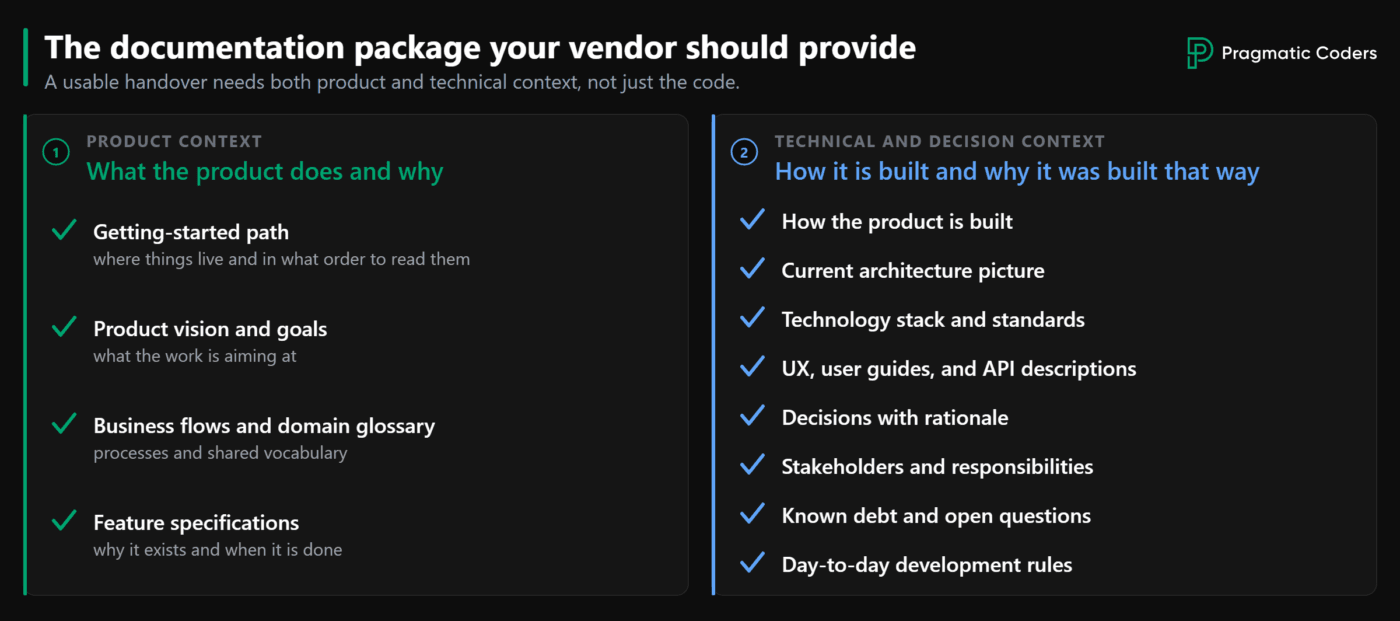
You need several related elements: a project map, product description, business processes, feature specs, architecture, technical decisions, and ways of working. That set is enough for a new person (or an AI agent) to ramp up without asking hundreds of questions or reading the code line by line.
On the product side, require at least the following:
- Getting-started map — where things live, how to work, what to read, and in what order.
- Product vision and goals — what to aim at when planning the work.
- Business flows, actor types, and a domain glossary — without these, newcomers learn the system from the UI or the code, which can take weeks.
- Feature specs — why a feature exists, how you know it is done, and what it deliberately leaves out of this iteration.
What You Need on the Technical and Decision Side
On the technical and decision side, require at least the following:
- “How to build it” technical description — keep it separate from product requirements. When the two get mixed, documentation bloats and becomes harder to update.
- Architecture outline — a general picture of the system, how the parts relate, and where they meet. C4-style diagrams (even at higher levels) help both people and AI see new connections.
- Stack and standards — so the code stays consistent and code review stays predictable.
- Access to UX, user documentation, and API descriptions (for example Swagger) — how the system should behave from the outside.
- Decisions with rationale — what was chosen, why, and against which decision factors (for example time-to-market versus scalability). This unifies language across the team: “performance” stops meaning something different to each person.
- Stakeholders — who is who, whom to ask, and what the communication expectations are.
- Open debt and unresolved topics — kept separate from the scope of a given feature.
- Short day-to-day rules — ones you can enforce, not essays about a “culture of quality.”
You can have a tech lead verify how these materials are structured.
How Software Vendor Documentation Should Be Structured and Kept Current
Just having documentation guarantees nothing. If the vendor’s team does not use it, does not update it as the code changes, and you cannot pull decisions from it, it is useless.
In one project we supported, someone generated AI “documentation” as a 70-page PDF. Nobody could take it in or make sense of it, so the knowledge still walked out with the people.
Documentation worth requiring usually sits close to the code, in a place your team and the vendor reach every day.
How do you check? Ask someone on your side (a tech lead, or a new person on your team) to answer one question in an hour: how to make a small change to an existing feature without digging through the code or Slack. If the answer takes three conversations with the vendor, the documentation is not working. It works when you can find the right material and understand the constraints without asking people at the vendor.
Require that agreements which change over time do not get mixed into the current material. Older versions can stay in repository history. In the live documentation, developers and AI agents should see the decision currently in force — not several versions from different stages of the project. An unstructured “decision dump” is especially dangerous: potentially thousands of lines where the old decision stays in the document and the new one is appended below. A human can still get through it — it just takes longer. An AI agent will pick whichever version of the agreement looks best for the problem it is solving right now — and that will not necessarily be the one currently in force.
So require documentation that is current and readable — not a bulky document.
How Documentation Reduces Tech Debt From AI Coding Agents
An AI agent on a project behaves like a very fast junior who joined for a single day. If it does not get a project map, the rationale behind earlier choices, and current agreements, it will base its assumptions on something else. For example, it will derive them from raw code. Then it will write code that matches those assumptions. Code review may let it through: locally, everything will look sensible. The effects only become visible a little later. Subsequent changes get more expensive, and the system gradually loses coherence.
Documentation close to the code works as a contract between humans and AI. It shows the agent what to read, what not to touch, and which assumptions still apply. Without it, the agent fills its own knowledge gaps and writes them into the code as if the team had approved them. Technical debt then builds quietly — and faster than with hand-written code.
Fragmented knowledge is a separate issue. One decision sits in Confluence, another in tickets, a third was only agreed verbally. A person can piece all of that together. An AI agent, by contrast, works only from what lands in the task context and what it finds in the repository. That is why a single up-to-date set of documentation close to the code beats knowledge spread across many people and communication channels.
Do not require separate documentation “for AI” from the vendor. Require the same set you would give a new hire — just in a form an agent can actually use: close to the code, kept current, and free of conflicting versions in one place. The less the agent has to guess for itself, the less accidental debt ends up in the product.
Benefits of Up-to-Date Documentation From Your Software Vendor
Documentation will not remove risk. It will shorten onboarding, limit chaos during turnover, and make it easier to change technology partners.
A new person on your team or the vendor’s will not have to reconstruct the project’s history from commits and Slack. Knowledge will not disappear with a contract termination. When the engagement ends, it will be easier to escape classic vendor lock-in: the situation where you formally own the code, but in practice only the current team can change it safely. You will also raise the bus factor: critical context will no longer live in one person’s head.
When you work with AI agents, there will be fewer guesses in the code and fewer implementations built on “the model said so.” Tests, code review, and solid foundations will still be needed. Good documentation will, however, make an agent’s bad assumptions surface earlier — not only once the damage is done.
Documentation Alone Isn’t Enough: Check the Product’s Technical Health
Even the best documentation will not save a product if its foundations are shaky — if testing, deployments, monitoring, and a safe delivery process are all falling short.
Fortunately, products rarely break overnight. Their condition declines gradually as features pile up. That gives you time to react. Download our technical health checklist and assess what works and where the gaps are — before shortcomings get expensive.
If you already know what to require from the vendor on documentation, but you are unsure about the rest of the product’s technical health, that checklist is a solid next step.
What to Do When Your Software Vendor Won’t Transfer Knowledge
A clear list of documentation requirements only works when the vendor is willing to cooperate. If they block access, go silent, or promise to hand over documentation later, this is no longer about paperwork. It is an operational problem: you have no visibility into the product you are paying for.
In one project we took over, the previous vendor offered almost no cooperation, and the existing code held no promise. We had to take control of the project fast and rebuild it from scratch — the deadline was fixed. A formal handoff on paper would not have helped.
If you are in a similar situation, you need a plan for how to regain control of the product after a vendor that will not cooperate or will not deliver. In those moments, our technology project takeover service helps: we step into the project, put the situation in order, and take the wheel after a vendor that failed.
Conclusions
Documentation from an external software vendor has value only when it is complete, current, and usable without extra context. A PDF written at project kickoff does not qualify.
That kind of documentation does not remove risk, but without it the product is much harder to keep running when key people leave or you change vendors. So check the state of your vendor’s documentation. Ask for an onboarding path for a new person — where the docs live and in what order to read them — plus business processes, decisions with rationale, and a current view of the architecture. If all you hear back is “everything is in Confluence,” that is a signal the documentation does not meet the standard.