Why SaaS Financial Reports Don’t Match Across Sources
You open the invoice report, the general ledger, and the payment dashboard. All three show data for the same month, but the amounts don’t match. First instinct: there’s an error somewhere. A discrepancy doesn’t have to mean that any of the reports is wrong, though.
One source may record a transaction in a period based on the service date, another based on the payment date, and a third based on the date the funds arrive. Before you request a fix, you need to establish whether the reports are applying different rules, or whether the data has actually fallen out of sync across systems.
This article shows you how to tell those two cases apart, find the source of the discrepancy, and fix the problem so it does not recur in later reports.
Key Points
|
Different Financial Reports Can Be Correct Even When the Numbers Don’t Match
An invoice can be issued, a payment made, and the funds received on different days. That is why reports can show different figures and still reflect what actually happened.
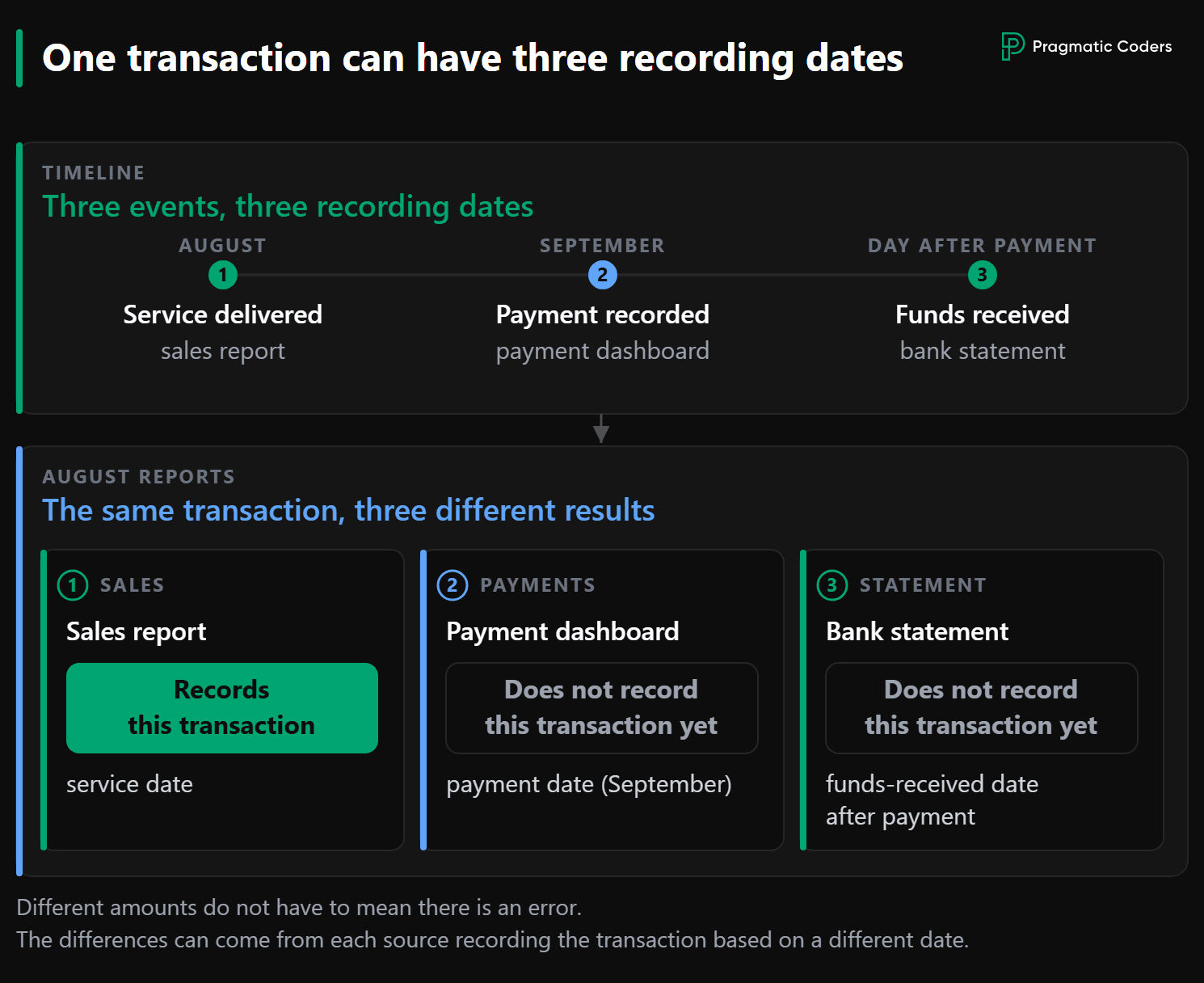
Suppose the invoice is for a service delivered in August. The client pays in September, and the bank confirms that the funds arrived the next day. One transaction therefore has at least three relevant dates: the service date, the date payment was recorded, and the date funds hit the account.
The sales report may assign the amount to August. The payment processor dashboard will show it in September. The bank statement will include the funds a day later.
So you should not expect the same August figure to appear in all three reports. You need to be able to say why the same invoice appears in the August sales report and in the September payment dashboard. You wouldn’t judge an IT budget by a single metric either: what matters is what the number means and what you compare it with.
Before you request a fix, check that you aren’t comparing August sales with September payments.
Establish Whether the Reports Use the Same Definitions and Dates
Before you assume the data is wrong, establish what period each report covers, which date it uses to assign a transaction to the period, and how it treats later changes.
Suppose an invoice dated August 1 is canceled on September 10, and the August report is then generated again. What amount should that report show?
The invoicing module may omit the invoice, because it was canceled on September 10. The general ledger (GL) may still include it based on the state as of August 31 (the receivable existed at that point, after all). Both reports can be “correct” in that case, even though they show different figures.
In this example, one report reflects the state after cancellation, while the other reflects the state before it. Your reports may differ for the same reason or for a completely different one. Since the numbers already do not match, you need to understand why before deciding whether a fix is needed.
Canceling an Invoice Does Not Always Mean the Same Thing
How a document is canceled directly affects what the report shows. The system may mark the invoice as void, or it may create a separate adjustment document.
In the first case, the invoice may disappear from the current report. In the second, it remains in the historical record, and the adjustment document offsets the invoice amount. A report for the period between the invoice date and the correction date will therefore show a different amount than a report run after the correction.
Whether the system omits a canceled invoice or includes it along with the adjustment document changes what the report contains and the total it shows.
The Same Transaction Can Have a Different Date in Different Reports
The time zone can also determine which date a transaction appears under in a report. One module may use UTC, while another uses the client’s local time.
A transaction close to midnight can then be assigned to different days in different modules. If the transaction falls on a month boundary, it can also affect that month’s total. That may be an implementation bug, but it may also result from a deliberate rule. The problem starts when nobody can explain that rule.
If the definitions are consistent and the numbers still differ, you need to consider the second possibility: the data itself may be out of sync.
Check Whether the Data Has Fallen Out of Sync Across Modules
Consistent definitions do not guarantee consistent data. A given operation may have succeeded in only part of the system.
Suppose the invoice cancellation succeeded in the invoicing module. But the accounting module rejected the change because the previous month had already been closed. The user sees a canceled document, but the invoice amount remains in the ledger.
Several steps were supposed to make up a single operation, but the system completed only some of them. If the error was not handled correctly or the message was ignored, the problem may go unnoticed. That’s called a silent failure.
This kind of problem is harder to detect and handle in systems that process events in the background or split a process across multiple services. That does not mean microservices inherently lead to data corruption. The risk comes from mishandling the case where only part of the operation succeeds.
The system may try to roll back the steps it already completed. But the rollback can fail too. The more stages an operation has, the more intermediate states can arise.
In the previous section, the problem was the same valid data being interpreted differently. Here, two modules describe contradictory states. This is the kind of data inconsistency that creates costs later. To determine which case you are dealing with, you need to find a specific transaction.
Narrow the Analysis Down to a Single Transaction
Don’t try to explain the whole report at once. Find the smallest data range for which the sources still show different results.
Comparing totals alone will confirm that the problem exists, but it will not explain how it happened. To do that, you need to go one level deeper:
- Compare the same sources and the same period. Set the payment dashboard, the invoicing module, and the accounting module side by side.
- Check the pattern over time. See whether a similar difference repeats in the following months.
- Narrow the range. Move from a month to a week, a day, and a specific transaction.
- Reconstruct the sequence of events. Compare dates, statuses, and successive steps across all modules.
- Determine the cause. Establish whether you are looking at different definitions or an actual data inconsistency.
A recurring difference can be especially informative. If it matches the VAT rate each month, it’s worth checking whether tax is being omitted in one source or double-counted in another.
A fluctuation from 7.5% to 9% does not rule out a common cause. The error may affect only adjustment documents, reversed payments, or a particular transaction type. The percentage then varies with the share of those events in that month.
Only by tracing a single invoice can you see why module A and module B show different results. Sometimes you’ll find a bug. Other times, the data is correct and the system is behaving according to a rule that was never documented.
Where does AI help? AI can draft SQL queries from the schema and help compare results. It does not know the business definition, though, unless that definition is in its context. It’s safer if AI proposes a query, a human checks it, and only anonymized results are passed to AI for further analysis. Unrestricted AI access to the production environment poses a risk to data confidentiality and system performance.
Fix the Definition, the System, and Historical Data
Changing one record may close a ticket, but it does not remove the cause. A lasting fix has to address three things: the report definition, the system’s behavior, and historical data.
If the team corrects the date on one adjustment document, the client will see the expected amount again. But the system can still produce the same inconsistent state, and historical data may contain other similar cases.
That is why the fix should cover three layers:
- Definition. Business stakeholders, the finance team, and the technical team agree on how each report should assign a transaction to a period and what the data in the report should mean.
- System. Fix the code and error handling so the same inconsistency does not arise again.
- History. Decide whether to recalculate old data, flag a methodology change, or set a date from which the new rule applies.
The report definition should not exist only in the heads of the people who handled the incident. It should be documented and accessible to users, the finance team, the technical team, and the tools used for analysis.
In six months, the people who made the fix may no longer be on the project. If they are the only ones who know that definition, the bus factor drops to one. A new team member should be able to understand why reports generated before September 1 behave differently from those generated after that date.
This is exactly where data debt arises. It is made up not only of incorrect records, but also of missing documentation that explains what the correct data means. Without that knowledge, a few months later the team will be forced to fix the same problem again.
Assess Whether Mismatched Reports Are a Symptom of a Larger Problem
Recurring differences can mean the problem goes beyond a single report, especially when the team cannot explain the report definitions, errors vanish without a trace, and fixes do not cover historical data.
In that situation, a CFO or CEO does not have to commission a large audit right away. They can start with a self-assessment of the IT project. This helps determine whether contradictory reports are an isolated data problem or part of a broader loss of control over the product.
If the assessment shows that the project lacks a clear picture of its current state, ownership, and process, isolated fixes may not be enough. In that case, a technology project rescue service can help bring structure to the way the team works, manages risk, and delivers on its commitments.
Conclusion
Different financial reports do not have to mean there is an error. They may use different dates to determine which reporting period a transaction belongs to, reconstruct the state as of different points in time, or treat corrections differently. If the reports use the same definitions, look for an operation that succeeded in only part of the system.
The sequence matters: define how each report should treat the transaction, find the transaction, reconstruct what happened, then fix the system and the historical data. A reliable report does not have to show the same number as every other report. It has to make clear what question it answers, what data it is based on, and why it can be trusted.