Everything Is Under Control? How to Recognize the Watermelon Effect Before Your IT Project Sinks

This article explores the ‘Watermelon Reporting’ phenomenon in IT projects – where status reports are ‘Green’ on the outside but ‘Red’ and failing on the inside. Learn how to spot warning signs, understand why teams hide the truth, and get practical steps to build a culture of real transparency.
TL;DR
|
What is the Watermelon Effect in IT Projects?
Watermelon Reporting refers to IT project updates that show “green” status externally but hide “red” conditions – real problems like bugs, delays, or lack of progress. It’s a metaphor for a common misalignment between reports and reality.
The “Status Green” Paradox
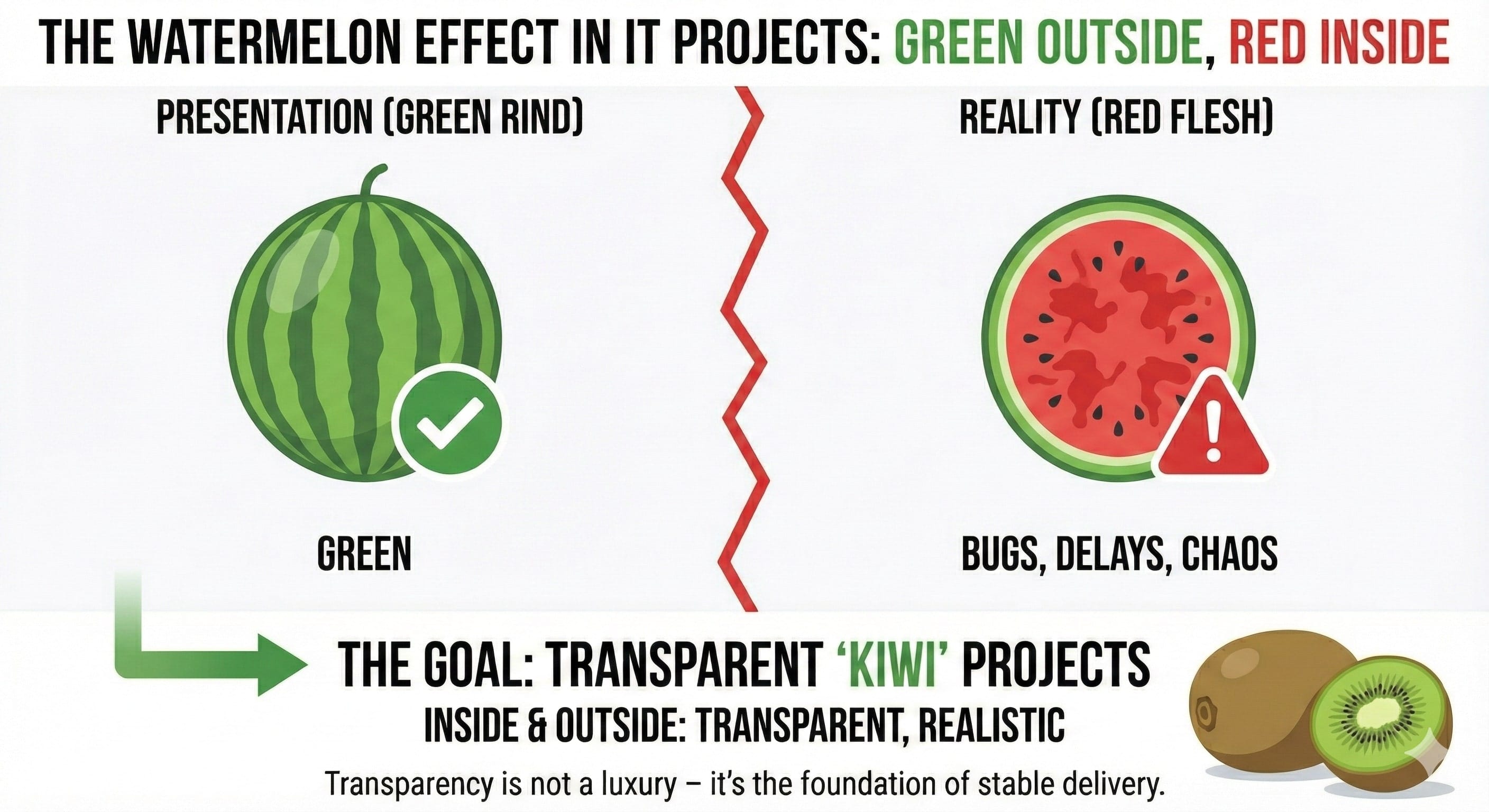
Imagine this scenario: it’s Tuesday, 9:00 AM. You’re sitting in your weekly status meeting. The conference room smells of freshly brewed coffee, and on the screen is a presentation prepared by your IT vendor’s Project Manager. Every slide radiates a soothing, succulent green. “Scope? Green. Schedule? Green. Budget? Green.”
Everything looks perfect. This is the moment you should feel relieved, right? And yet, your intuition, honed by years of managing people and processes, tells you something is wrong. You listen to the assurances that “everything is under control,” but in your mind, you’re playing back yesterday’s conversation with one of your key stakeholders.
In the IT industry, we often hear from frustrated managers who feel they are losing control over their investments. One of them put it: “They tell me everything is going according to plan, yet I haven’t seen a single new feature on the testing environment for three weeks. I don’t have the foggiest idea what will actually be ready for the launch. I feel like I’m buying a pig in a poke, except the poke is painted green.”
Another high-level operational stakeholder shared similar concerns regarding the quality of the delivered solutions: “I want clarity on how we’re actually accepting these sprints. The vendor’s PM claims they are ‘accepted,’ but my people say half the things aren’t working as they should. Who is actually in charge of quality here?”
If you’ve ever been in this situation, congratulations – you’ve just experienced the Watermelon Effect. Your projects are green on the outside, but as soon as you try to stick a knife in and look inside, bloody red leaks out: delays, bugs, chaos, and wasted budgets.
What Causes Watermelon Reporting in IT Projects?
Why “watermelon”?
The metaphor is simple but accurate. A watermelon looks fine on the outside – smooth, green, solid – but you don’t see the rot inside until you cut it open.
In IT, that green rind is the RAG (Red-Amber-Green) report. It’s the polished PowerPoint slides Project Managers prepare before meetings. Most PMs aren’t trying to deceive; they just know reporting a red status leads to blame, not help.
No one builds a career by delivering bad news. So, problems get softened through layers of optimism until the report shows “90% done.” But in software, the last 10% often takes as long as the first 90%. That’s the 90/10 Rule.
Why Do Teams Hide Problems in Reports?
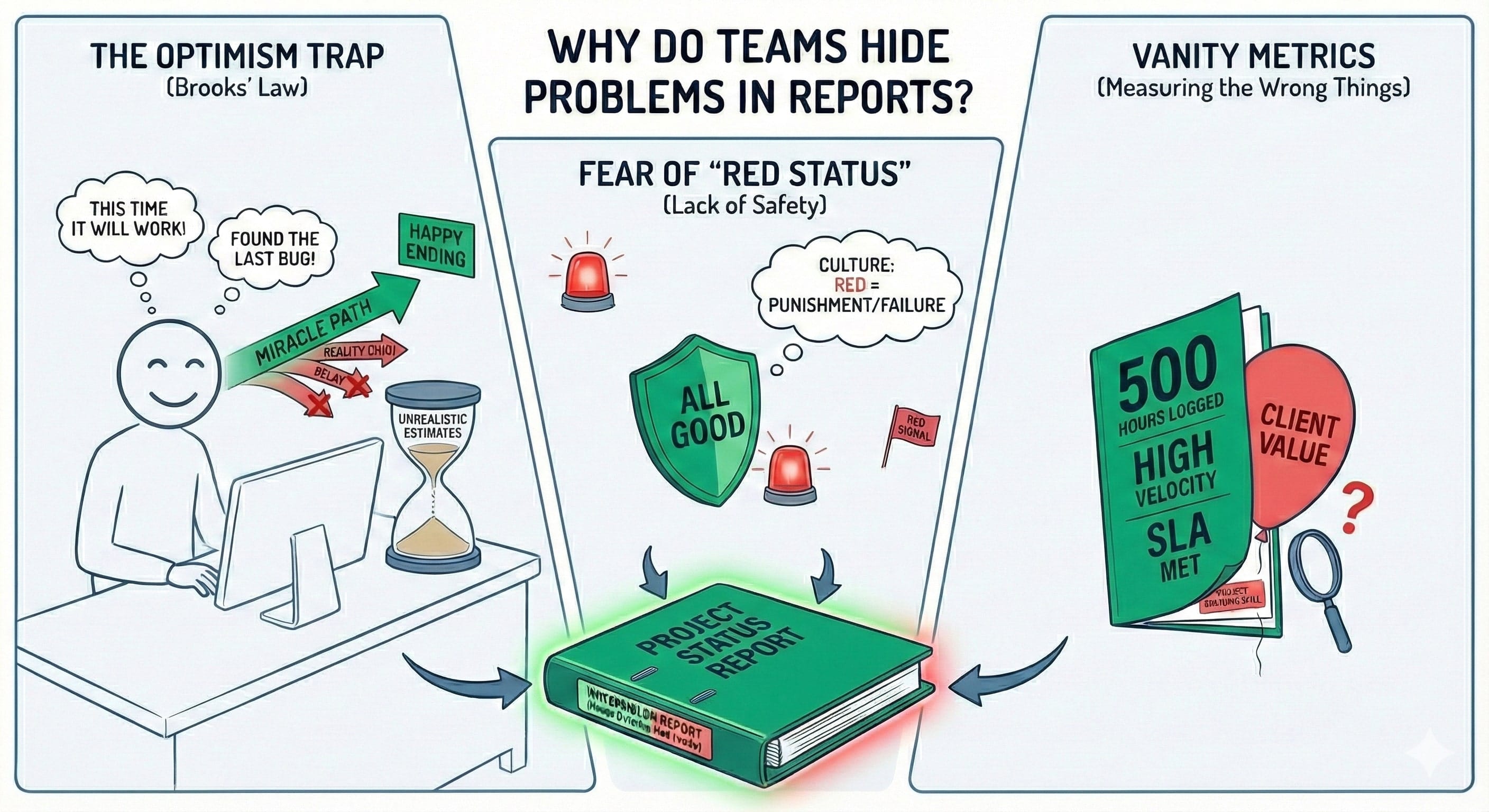
Brooks’ Law and the Curse of Programmer Optimism
Are you familiar with Frederick Brooks’ classic book, The Mythical Man-Month? If not, I sincerely recommend catching up. Brooks noticed as far back as 1975 something that is just as relevant today: “All programmers are optimists.”
Brooks argued that this modern alchemy attracts people who believe in happy endings. The result? Time estimates are almost always too low because they assume a scenario where everything goes perfectly. “This time it will surely work,” “I found the last bug yesterday,” “It’s just a configuration issue.” These are the incantations you’ve heard hundreds of times.
When a plan becomes unrealistic, the vendor’s PM is faced with a choice: admit the mistake (red color) or believe in a miracle (green color). Most choose the watermelon path of hope.
Lack of Psychological Safety
This brings us to a fundamental point that Rob Lambert often writes about in Cultivated Management. Watermelon reporting thrives in cultures where “red status” is associated with failure, incompetence, or a reason for shame, rather than a signal for mobilization.
The Trap of Vanity Metrics
We often measure the wrong things, giving the vendor the perfect tools for growing watermelons. A vendor might report that they are meeting SLAs, that their Jira velocity is high, or that they “clocked” 500 man-hours this month. Great. But what does it matter if you, as the client, feel the project is standing still?
What Are the Warning Signs of Watermelon Projects?
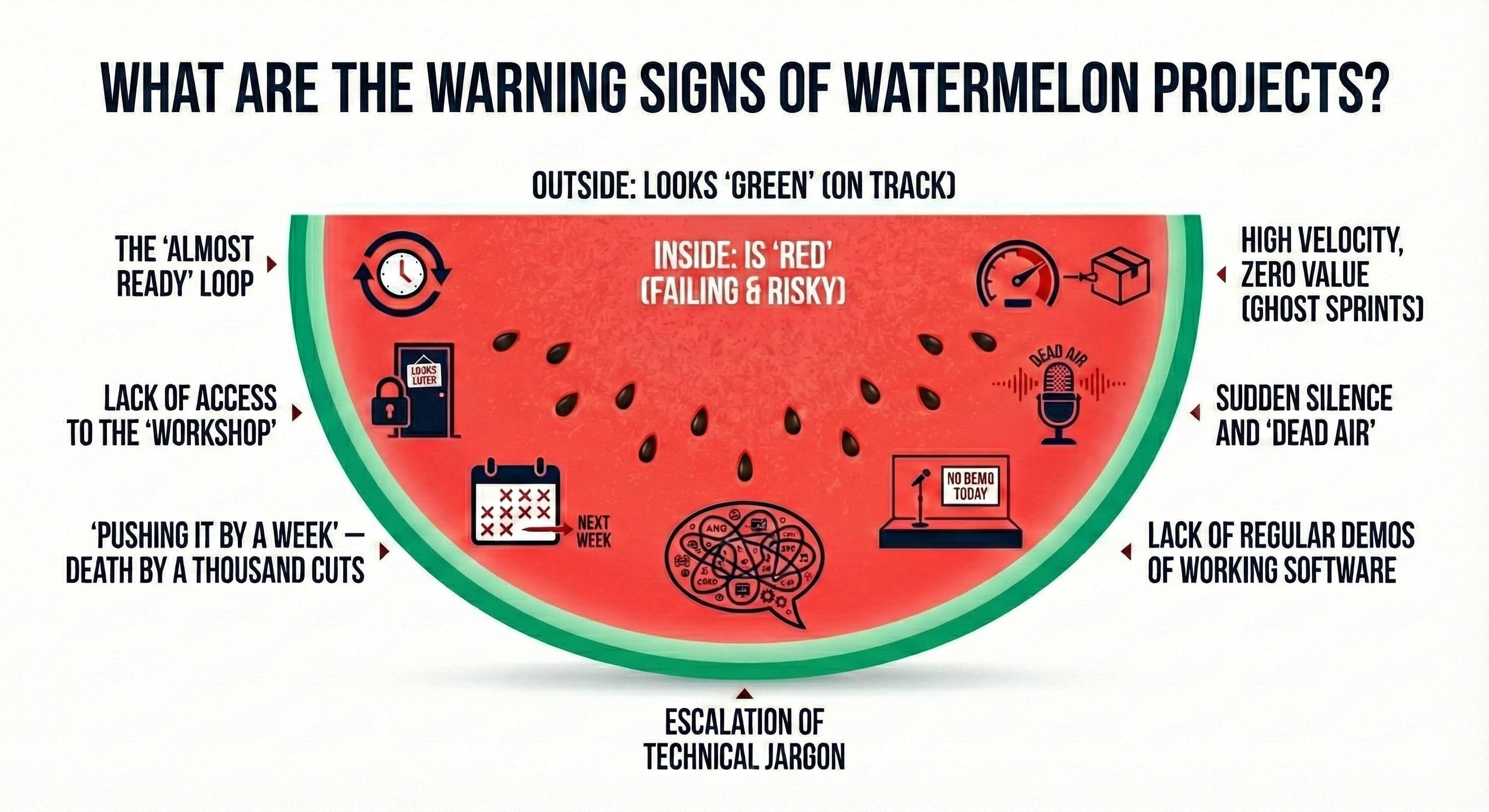
Now that we know why a watermelon is created, it’s time to learn how to recognize it before it becomes too heavy to carry. I’ve prepared a list of “micro-symptoms” for you, which as an experienced manager, you should track. If you notice more than three of the following points from your vendor, you’re likely holding a prime specimen from a watermelon plantation.
1. The “Almost Ready” Loop (The Chronic 90% Syndrome)
You hear this every week: “Feature X is 90% ready; we just need two more days for fine-tuning.” Two weeks pass, and the status is still “90%.” In IT, “almost ready” is the most deceptive status in the world. Usually, it means the team has hit an architectural wall they don’t know how to climb over but are afraid to admit it, hoping for a “sudden flash of genius.”
2. Lack of Access to the “Workshop” (Repository and Jira)
Believe me, if a vendor tells you that “for your convenience and peace of mind” they will prepare summary reports in PDF instead of giving you direct access to Jira or the code repository, you should feel a chill down your spine. Why? Because a PDF will take anything, while Jira shows the truth: when a task was opened, how many times it returned from testing for a fix, and who is actually working on it. Lack of insight into the real work environment is an invitation to grow watermelons.
3. “Pushing it by a Week” – Death by a Thousand Cuts
Brooks wrote that projects rarely get a year late overnight. They get a day late… three hundred and sixty-five times in a row. If every one of your demos is pushed “only by a week” for some trivial reason (illness, minor configuration error, “waiting for access”), it’s a sign that planning is completely off and the team is desperately improvising.
4. High Velocity, Zero Value (Ghost Sprints)
The team reports great results, burndown charts look perfect, points are going up. But you don’t see your business gaining from it. Teams often “stuff” statistics by closing simple technical tasks or refactoring code, while critical business features you promised the board are lying idle.
5. Sudden Silence and “Dead Air”
Nothing heralds trouble like a change in communication dynamics. If your Project Manager, who was previously very reachable, suddenly becomes hard to get hold of, gives vague answers, or avoids specific questions about status, they are probably spending that time “extinguishing fires” you don’t know about yet. In IT, no news is usually bad news.
6. Lack of Regular Demos of Working Software
As you surely know, the only objective measure of progress in IT is working code. If two or three sprints have passed and you’re still looking at Figma mockups, database schemas, or – worse – PowerPoint slides, instead of being able to go into a test environment and “click through” a new feature, it means the project simply isn’t there.
7. Escalation of Technical Jargon
When you ask, “Why isn’t this working?” and in response, you hear a fifteen-minute lecture on “problems with microservices synchronization in the Kubernetes cluster under specific race conditions of the database,” know that the PM is trying to blind you with science. Using complex jargon to explain simple delays is a common technique for masking a lack of progress.
- Also check:
![Is your project on fire [EBOOK]](https://www.pragmaticcoders.com/wp-content/uploads/2026/02/Is-your-project-on-fire-EBOOK.png)
Why Should You Use an External Auditor?
Sometimes as a leader, you are too close to the project to see the truth. You want to trust your team. But in technology, empathy without verification is a direct path to disaster.
An external auditor is like a “watermelon taster.” They don’t look at slides. They dig into the “meat” of the project:
- They check test coverage and CI/CD pipelines.
- They speak directly to developers.
- They assess morale and delivery constraints.
How to Build Transparent “Kiwi” IT Projects?
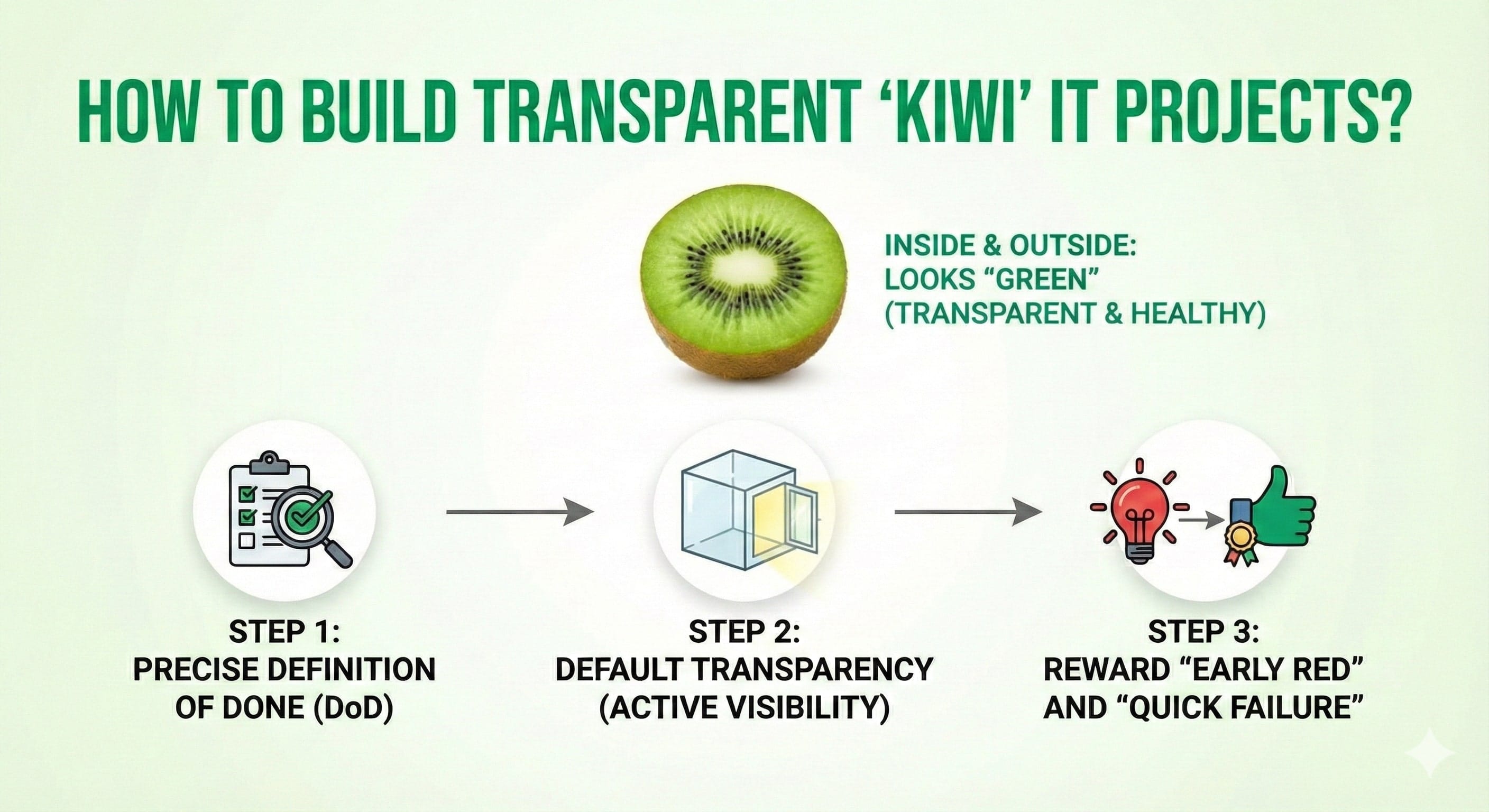
I don’t want to leave you with a pessimistic feeling that every IT project is a watermelon in disguise. There are projects we call “Kiwi” – they are green on the outside and just as green (and extremely healthy) on the inside. How do you manage them?
Step 1: Precise Definition of Done (DoD)
Most of the problems our clients faced stemmed from a lack of a DoD. If you don’t establish at the start exactly what it means for a task to be “finished,” the PM will always report progress based on their feelings. “Finished” for a programmer means: “It works on my machine.” “Finished” for the business means: “Tested, documented, accepted, and ready for use by the customer.” Until these two definitions meet, your project will be a watermelon.
Step 2: Default Transparency (Active Visibility)
Demand access to tools from day one. Don’t ask for status reports – ask for the opportunity to look at the task board. If the vendor has nothing to hide, they will gladly let you in. Process visibility disciplines both sides and makes “watermelon reporting” technically unfeasible.
Step 3: Reward “Early Red” and “Quick Failure”
This is the most important element of cultural change. As a leader, you must send a clear signal: “I’d rather hear about the skeleton in the closet today, when we have time to bury it, than in a month, when it starts to smell up the whole office.” Make reporting a risk or delay seen as an act of high professionalism and concern for business success, not an admission of guilt.
What to Do If You’re Already in a Watermelon Project?
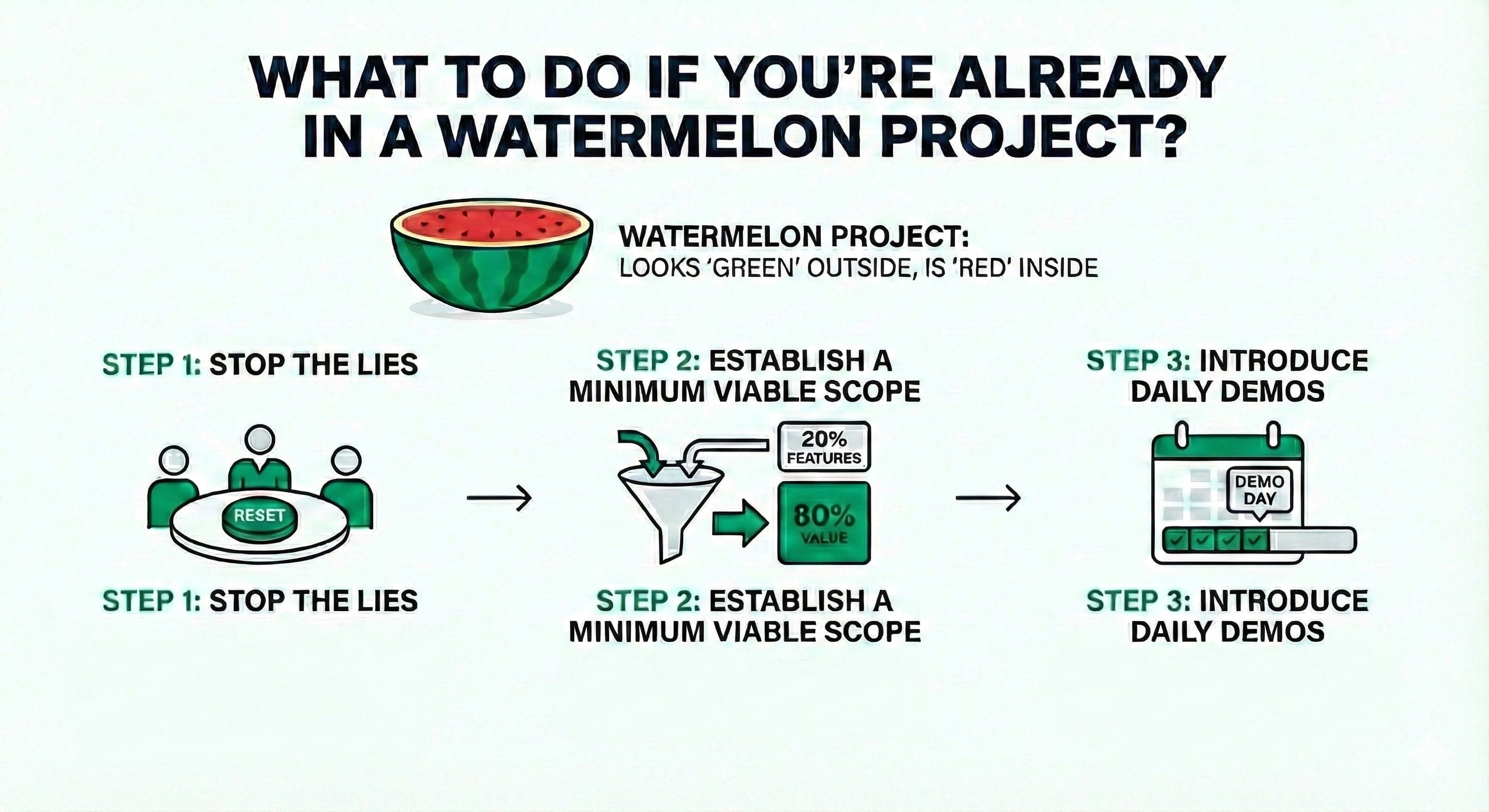
What if you’re reading this text and you’ve just realized that your current project is a large, ripe watermelon about to fall down the stairs? Don’t panic. There is a way out, though it can be painful.
- Stop the Lies: Call a “clean table” meeting. Tell the vendor’s PM: “I know the statuses are green, but my intuition and the facts say otherwise. From today, we’re resetting the counters. There will be no penalties for today’s truth, but there will be consequences for tomorrow’s lie.”
- Establish a Minimum Viable Scope: If the project is late (and watermelons are), forget about delivering everything. Choose 20% of the features that provide 80% of the value and focus exclusively on them. Brooks was right: you can’t add people, so you must cut scope.
- Introduce Daily Demos: Don’t wait for the end of the sprint. Demand to see progress every day. Even if it’s a minor button color change. Continuous verification will kill the watermelon in its infancy.
Summary: Cut Your Watermelon Open Today
The Watermelon Effect is not an act of God or the fault of “bad technology.” It’s a choice – made when we avoid difficult conversations and ignore signals. The later you cut your watermelon, the bigger the mess.
Pick up the knife. Ask the uncomfortable questions. Get into the repo. Watch the demos. Because it’s better to swallow the sour kiwi of truth today than to choke on a giant, bloody watermelon tomorrow.
- Feeling that your project is starting to “turn red”? Don’t wait for the explosion. At Pragmatic Coders, we specialize in professional IT audits and building transparent teams that deliver real value. We’ll help you slice through the watermelon and get back on the path to success. Contact us for a blunt, expert assessment of your project’s health.

Frequently Asked Questions
What causes Watermelon Reporting in IT?
Fear of blame, lack of transparency, and vanity metrics that don’t measure real value.
How can managers prevent Watermelon Reporting?
Foster psychological safety, ensure visibility, and reward honest updates early.
What is a Kiwi Project?
A project that’s green both outside and inside – fully transparent, value-driven, and tested regularly.
Sources and Further Reading
- Frederick P. Brooks Jr., The Mythical Man-Month
- Rob Lambert, Watermelon Reporting: When “Green” Hides Red
- Agile Management Office, Unmasking Watermelon Projects
- HappySignals, The IT Experience Framework