Automated Testing Cost vs. Skipping It: ROI Guide
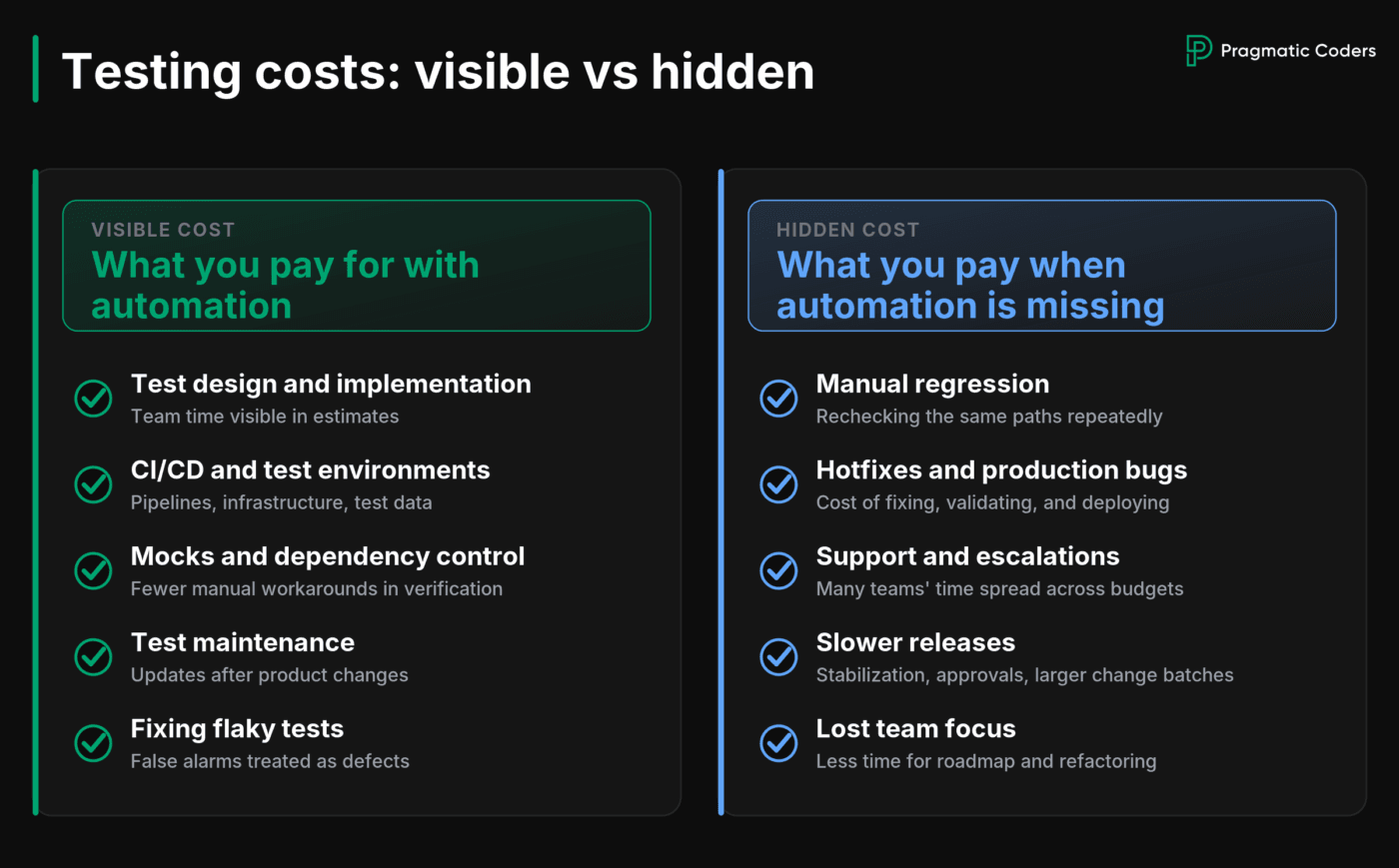
Building a clear test automation ROI case starts with comparing visible costs to hidden ones. Automated tests show up clearly in estimates, sprint plans, and engineering invoices. The cost of insufficient testing is harder to spot. It hides in regression work, hotfixes, support tickets, and releases that take longer than they should.
Having automated tests does not necessarily mean your product is well-protected. You may have hundreds of them and still leave your most important workflows uncovered. What matters is whether adding reliable automation to those workflows would save enough recurring work and risk to justify the cost of building and maintaining it.
Key Points
|
What Is Automated Testing? Unit, Integration, and E2E Tests Explained
Automated tests check whether software still behaves as expected after code changes. They run predefined scenarios, compare the result with the expected outcome, and alert the team when something breaks.
A unit test may verify a single business rule. An integration test may check whether two parts of the system still communicate correctly. An end-to-end test may follow a complete customer journey, such as signing in, placing an order, or making a payment.
Their main value is repeatability. Instead of asking someone to verify the same workflow manually after every change, the team can run the check automatically and receive feedback within minutes.
However, exploratory testing, usability reviews, and new or unusual scenarios still require human judgment. Automated tests are most useful for protecting behavior that is already understood and needs to work consistently.
This repeatable feedback gives teams the confidence to release, refactor, and update the product without checking every critical path by hand. But creating that safety net has a cost.
How to Calculate the Full Cost of Test Automation
Automated tests require an upfront investment and ongoing ownership. Writing the first scripts is only part of the cost.
Implementation may involve choosing the right test level, building the tests, and refactoring code that is too tightly coupled to verify reliably. That work competes with feature delivery, so it should be included explicitly in the estimate.
The supporting setup also matters. Depending on the product, the team may need:
Test Automation Setup Costs: CI/CD, Environments, and Infrastructure
- CI/CD pipeline changes;
- stable test environments;
- controlled test data;
- mocked external services;
- additional infrastructure.
Then comes maintenance. Tests must change when legitimate product behavior changes. Duplicate and obsolete checks need to be removed. Slow suites need attention before developers start avoiding them.
The Hidden Cost of Flaky Tests
When the same test passes or fails on identical code, developers must investigate whether the product is broken or the test itself is unreliable. Repeated false alarms waste time and gradually weaken trust in the whole suite. Once teams start rerunning failed pipelines without checking the cause, the safety net is no longer doing its job.
These costs are real. But they are only useful when compared with the cost of the current process.
The Hidden Cost of Manual Testing and Skipping Test Automation
A company without enough reliable automation still pays for verification, just not on paper. These costs are simply buried within several budgets and teams. And are one of 4 main delivery bottlenecks.
Manual regression is the most visible expense. If a tester spends four hours checking the same workflows twice a week, that is more than 400 hours per year. Add browsers, devices, user roles, and integrations, and the effort grows quickly.
Production defects cost more than the time required to write a fix. A typical incident can involve:
- support gathering customer context;
- an engineer reproducing and fixing the issue;
- QA validating the change;
- operations coordinating a hotfix;
- product managers moving planned work.
Teams that do not trust their safety net often compensate with longer stabilization periods, larger release batches, extra approvals, and postponed refactoring. While these measures seem reasonable at the time, they add up, making it harder and more expensive to ship changes down the road.
Fast feedback matters beyond quality assurance. DORA treats rapid feedback on software quality and deployability as a core part of continuous delivery. A slow or unreliable suite can become a delivery bottleneck rather than removing the bottleneck.
Research also shows the trade-off between initial effort and defect reduction. In four industrial case studies involving Microsoft and IBM teams, teams using test-driven development reported 40% to 90% lower pre-release defect density and 15% to 35% more initial development time.
TDD is not the same as all test automation, and four case studies do not predict your result. But they illustrate the decision clearly: additional effort can reduce later defect work. The question is whether that trade-off pays off in your product.
What Tests Should You Automate First? A Prioritization Framework
Do not calculate one return for “automating the product.” Individual workflows have different failure costs, execution frequencies, and maintenance needs.
High-ROI Test Automation Candidates: Payments, Authentication, and Core Journeys
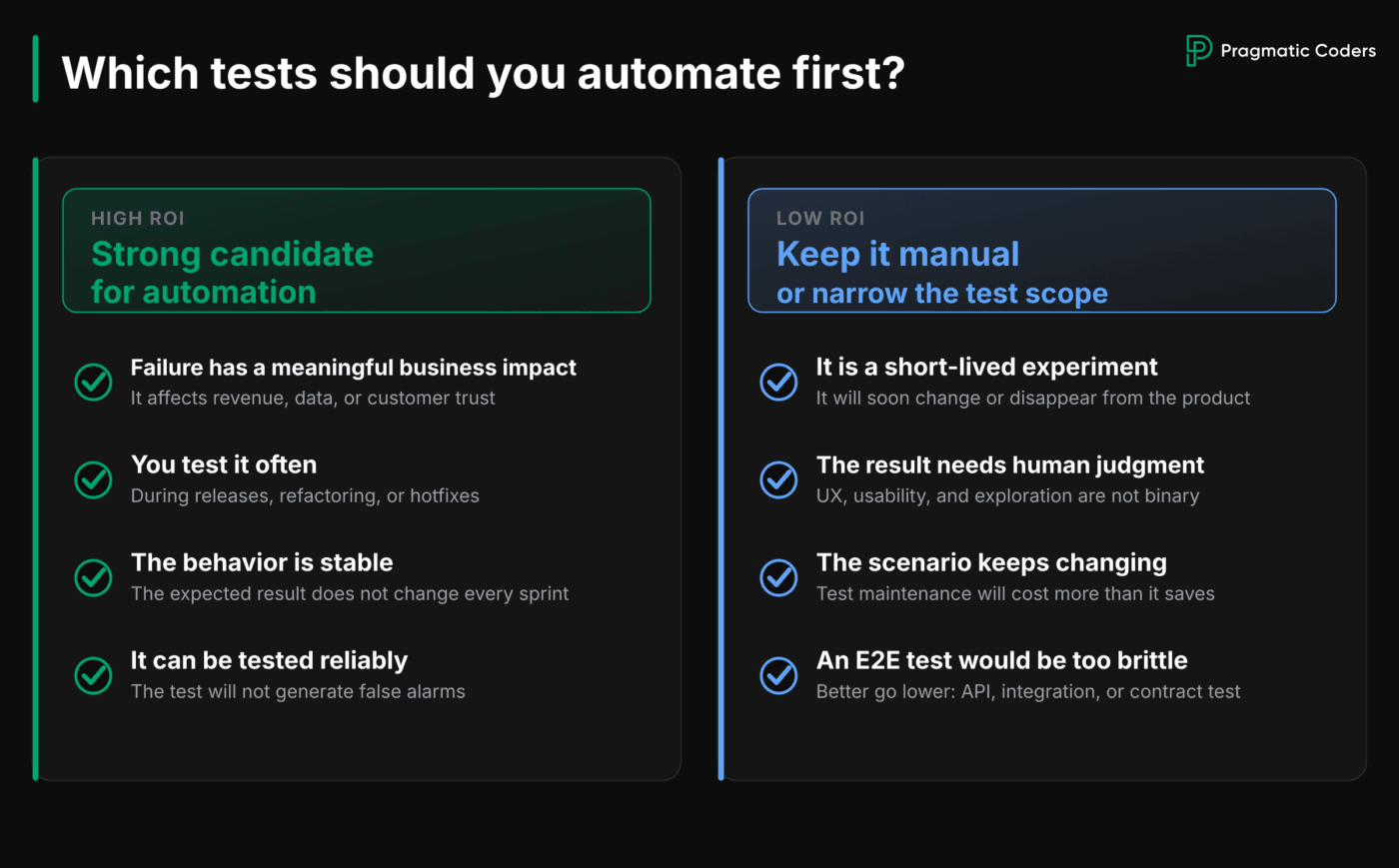
The best candidates usually combine four characteristics:
- Failure has a meaningful business impact;
- The check is repeated frequently;
- Expected behavior is reasonably stable;
- The scenario can be automated reliably.
Payments, billing rules, authentication, permissions, data integrity, API contracts, and core customer journeys often fit this pattern.
Your own history is more useful than a generic list. A workflow that broke four times last year and requires two hours of regression before every release deserves attention. A workflow that changes rarely, costs little to verify, and has a low probability of regression will rank lower.
Low-ROI Scenarios: When Manual Testing Is Cheaper
Some scenarios matter but are still poor candidates for automation. Short-lived prototypes, rapidly changing experiments, subjective usability reviews, and one-off migrations may be cheaper to check manually.
Technical feasibility matters as well. A critical workflow that depends on unstable third-party systems may create a brittle end-to-end test with constant false alarms. A narrower integration test may cover most of the risk with less maintenance.
You can structure the discussion with a simple prioritization score:
business impact × regression probability × execution frequency ÷
implementation and maintenance cost
You don’t need a complex formula. A simple 1–5 scale or basic low-to-high ratings will do. The goal is just to help your team decide which workflows to prioritize.
Once you have a shortlist, plug those workflows into the cost model below.
Manual Testing vs. Automated Testing: A 12- to 24-Month Cost Comparison Model
The most useful calculation compares two complete scenarios over the same 12- or 24-month period. Use the same release volume, product scope, and team costs in both.
You don’t need perfect precision. You do need consistent assumptions.
Scenario A: Baseline Costs Without New Test Automation
Use your current process as the baseline. Estimate:
- manual regression hours per release;
- the number of releases;
- time spent investigating and fixing production defects;
- support and engineering capacity lost to rework.
Include customer compensation, contractual penalties, or delayed-release costs only when you can estimate them credibly. Aim for a realistic baseline rather than a hypothetical worst-case scenario.
Scenario B: Costs of Adding Targeted Test Automation
Estimate the cost of introducing automated tests for the target workflows. This scenario should include:
- designing and implementing the selected automated tests;
- configuring CI/CD pipelines, test environments, and test data;
- ongoing maintenance and infrastructure;
- time spent investigating test failures;
- manual testing that will still remain;
- defects the new tests will not prevent.
Automation does not remove the need for exploratory testing, usability reviews, or human judgment. It also does not eliminate production incidents. The calculation should reflect a realistic reduction in recurring work, not a complete elimination of that work.
Test Automation ROI Example: When Does Break-Even Happen?
Consider a SaaS team that releases 24 times per year. The numbers below are hypothetical and only illustrate the method.
Test automation ROI comparison for a SaaS team releasing 24×/year:
| Cost Component | Without New Automation | With Selected Automation |
|---|---|---|
| Manual regression | 24 releases × 16 hours × €50 = €19,200/year | 24 releases × 6 hours × €50 = €7,200/year |
| Defect handling | 240 hours × €60 = €14,400/year | 140 hours × €60 = €8,400/year |
| Automation setup | €0 | €22,000 |
| Maintenance and infrastructure | €0 | €6,000/year |
| First-year total | €33,600 | €43,600 |
| Recurring annual total | €33,600 | €21,600 |
Automation costs €10,000 more in the first year because of the initial setup. From the second year, the modeled annual cost falls by €12,000. Under these assumptions, you break even on the investment around month 22.
Change the assumptions, and the answer changes.
A team releasing six times per year has a smaller recurring regression cost. A product with frequent incidents or daily deployments may break even much sooner. The value depends on how often the checks repeat, how expensive failures are, and how much maintenance the automation requires.
An industrial study of automated GUI test maintenance at Siemens and Saab reached a similar conclusion. Implementation and maintenance both affect return on investment, while lower existing manual-testing costs extend the break-even period.
The research concerned automated GUI testing, so its timelines should not be applied directly to unit, API, or integration tests. The practical lesson is simpler: use your own baseline.
How to Introduce Test Automation Without Slowing Delivery
You do not need to pause the roadmap and launch a separate six-month automation program. Start with a few workflows where the business case is strongest.
A practical sequence is:
- Use your baseline. Find where regression, defects, and hotfixes consume the most time.
- Select three to five workflows. Choose areas the business cannot afford to break and that are stable enough to automate.
- Add tests when those areas change. Bug fixes, new features, and refactoring create natural opportunities.
- Run the tests in the delivery pipeline. Feedback loses value when it arrives hours later or requires manual triggering.
- Measure the result. Compare regression hours, recurring defects, hotfix effort, and release delays with the original baseline.
- Treat unreliable tests as defects. Quarantining a flaky test may unblock the pipeline temporarily, but it does not restore trust. Someone needs to fix the cause or replace the test with a more reliable check.
- Review the results after several release cycles. Expand automation where it reduces cost or risk. Stop investing where maintenance consistently exceeds the value of the feedback.
This exercise may also expose a wider problem. Fragile environments, weak CI/CD, missing observability, or architecture that resists safe change will not be fixed by adding more test scripts.
What to Do Next: Root Cause Analysis vs. Delivery Infrastructure Fixes
The right next step depends on what the cost analysis reveals.
If the same bugs return despite repeated fixes, run a structured root cause analysis. Look beyond the individual bug and identify why the delivery process let it reach production.
If the analysis exposes unreliable environments, weak pipelines, limited observability, or architectural constraints, treat them as separate problems. Adding more test scripts will not fix weaknesses in the wider delivery system.
Conclusion: When Test Automation Pays Off, and When It Doesn’t
Automated tests are valuable when they remove more recurring cost and uncertainty than they create.
That return will not come from maximizing coverage or automating every scenario. It comes from protecting the workflows where failure is expensive, repetition is high, and reliable automation is feasible.
The goal is not a larger test suite. It is a product your team can change without treating every release as a gamble.